


Most video generators are
From storyboard to synthesis.
AI Filmmaking on Your Own GPUs.
Write a prompt, lock the look, render the shot — sound included.Text, image and video in one pipeline, with every step visible and timed.
Personal, non-commercial projectSource code and architecture notes — coming soon
- A 1152×672 still, end to end
- ≈26s
- A 5.17 s clip with sound, end to end
- 57–76s
- One render, two machines, three GPUs
- 2 · 3
- H3 DiT variants that ran on one RTX 5080
- 37/40
Measured 2026-10-18. Stills: four t2i renders, 25.8–26.9 s, with text encoder, DiT and VAE on the RTX 5080 and compositing on the CPU. Clips: four fl2va renders, with text encoding on the DGX Spark (GB10), DiT and video decode on the RTX 5080, audio on the RTX 3060.
One Character. Thirteen Real Outputs.
An original character, The Courier — from a character sheet to stills to clips with sound, all rendered with Phasyn Studio on two machines. About 11 minutes of render time in total.
Contains AI-generated content (MiniMax H3, Qwen-Image 2.1)
Four Stills. Four Clips with Sound.
 AI-generated · Powered by MiniMax H3
Rainy Night Alleyfl2va · seed 202 · 57.2 s end to endtext on GB10 · DiT and video on RTX 5080 · audio on RTX 3060  AI-generated · Powered by MiniMax H3
Aurora Over the Seafl2va · seed 303 · 57.4 s end to endtext on GB10 · DiT and video on RTX 5080 · audio on RTX 3060  AI-generated · Powered by MiniMax H3
Waking in Lightfl2va · seed 404 · 58.6 s end to endtext on GB10 · DiT and video on RTX 5080 · audio on RTX 3060  AI-generated · Powered by MiniMax H3
Cliff at Dawnfl2va · seed 101 · 76 s end to endtext on GB10 · DiT and video on RTX 5080 · audio on RTX 3060
Times are end to end as recorded by the controller, not including model start-up (11–46 s per switch). Native video output is 768×448; the web copies are loudness-normalized only (raw output is about −37 to −50 LUFS, AAC 32 kHz).
See All OutputsWhy I Built It
- Most video generators are
bad, expensive, and sold by the credit. - Local tools like ComfyUI ignore
how people actually work — and how fast it could run.
So I built my own.
One process per model component, on the GPU I choose — and every call measured.
— DennySORA, developerRead the Full Story
Text, Image, Video. One Pipeline.
From one prompt to a clip with sound. Every step is visible, and every step can be changed.
- 01Text
Start with Words.
Write a prompt. Image Studio turns it into an image; in Video Studio, @Image1, @Video1 and @Audio1 point to references — with snippets, block view and a formatter right at hand.
- Prompt
- @ references
- Snippets
- 02Image
Lock the Look.
Generate with Qwen‑Image 2.1 in Image Studio. Every generation stays as a take you can compare — then pick one as a shot’s first frame.
- Text to image
- Image to image
- Masked edit
- 03Video
Bring It to Life — Sound Included.
Text, image, video and audio can all be references. MiniMax H3 generates the picture and synchronized sound together.
- t2va · text
- fl2va · first frame
- ref2va · references
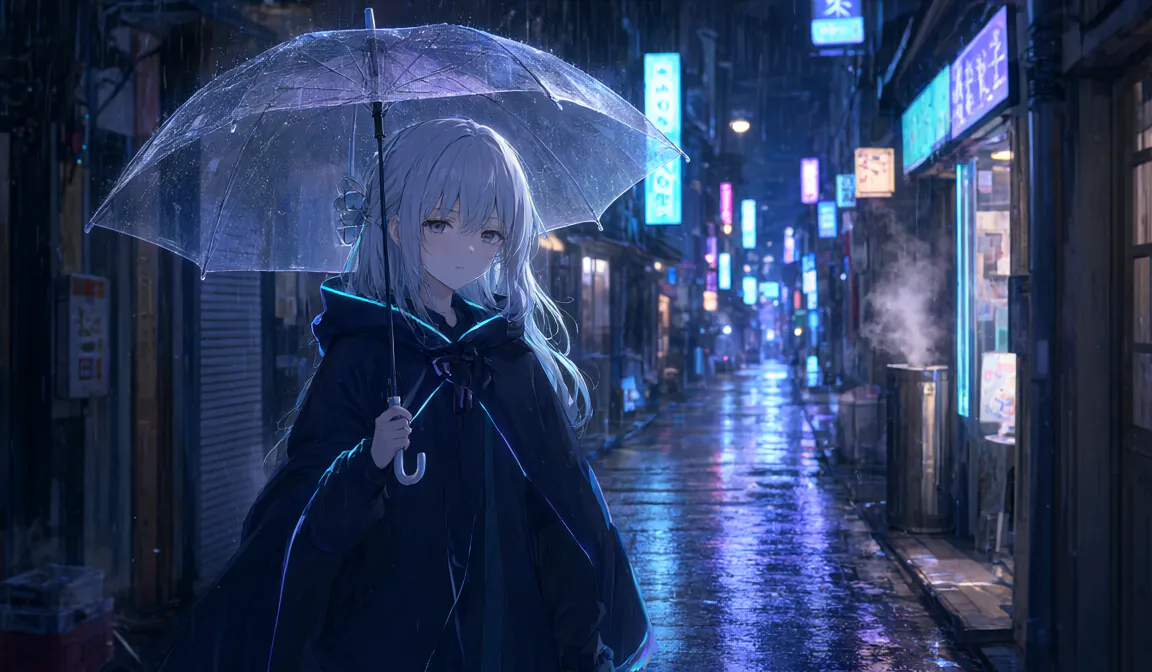 AI-generated · Powered by MiniMax H3Real output
 First frameH3 fl2va768×448 · 5.17 s · cfa759dfAI-generated · Qwen-Image 2.1
Real output: with this Qwen‑Image 2.1 still as the first frame, H3 fl2va generated the clip, sound included (run cfa759df).The web copy is loudness-normalized; the raw output is about −37 to −50 LUFS, AAC 32 kHz.
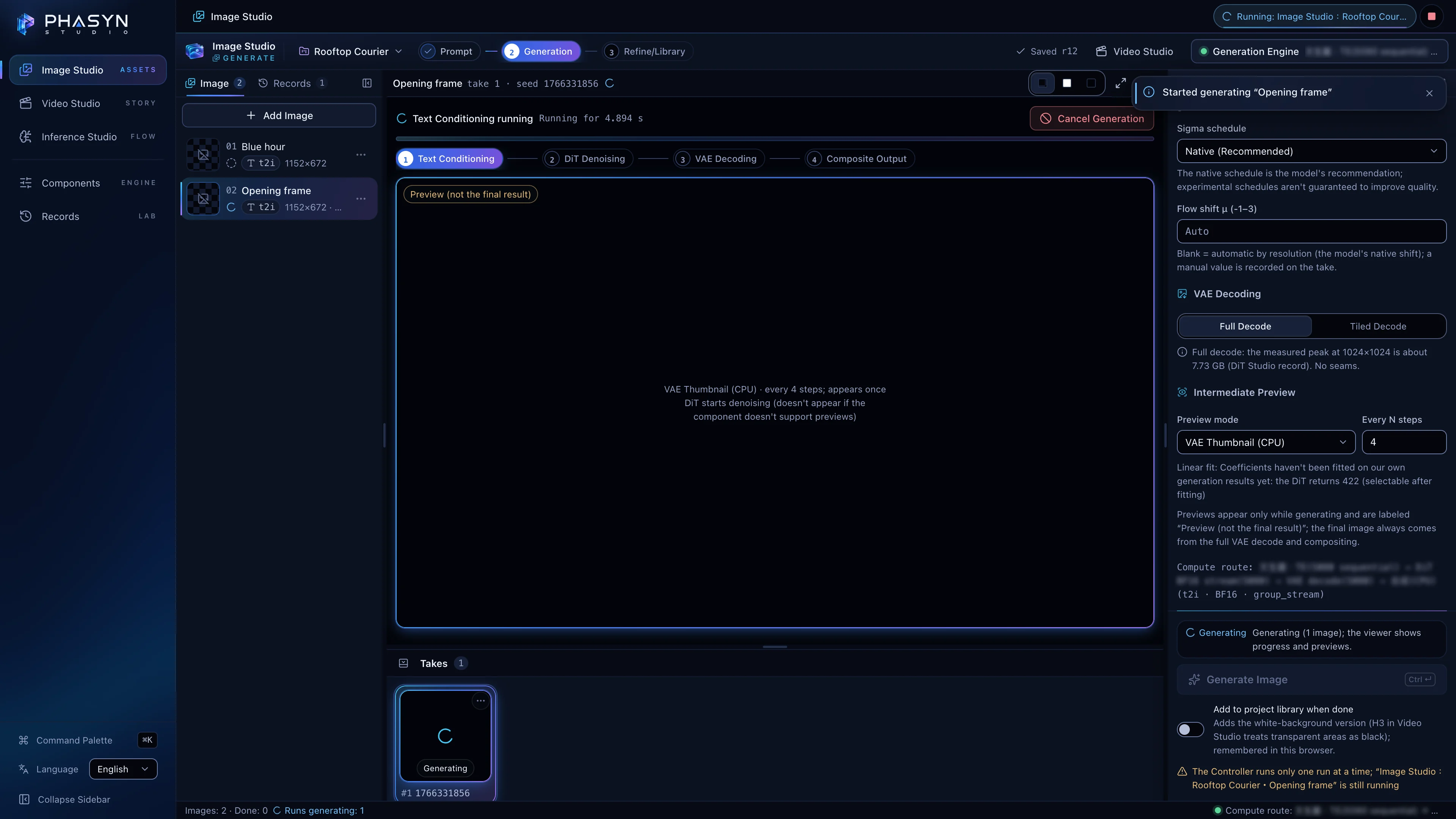
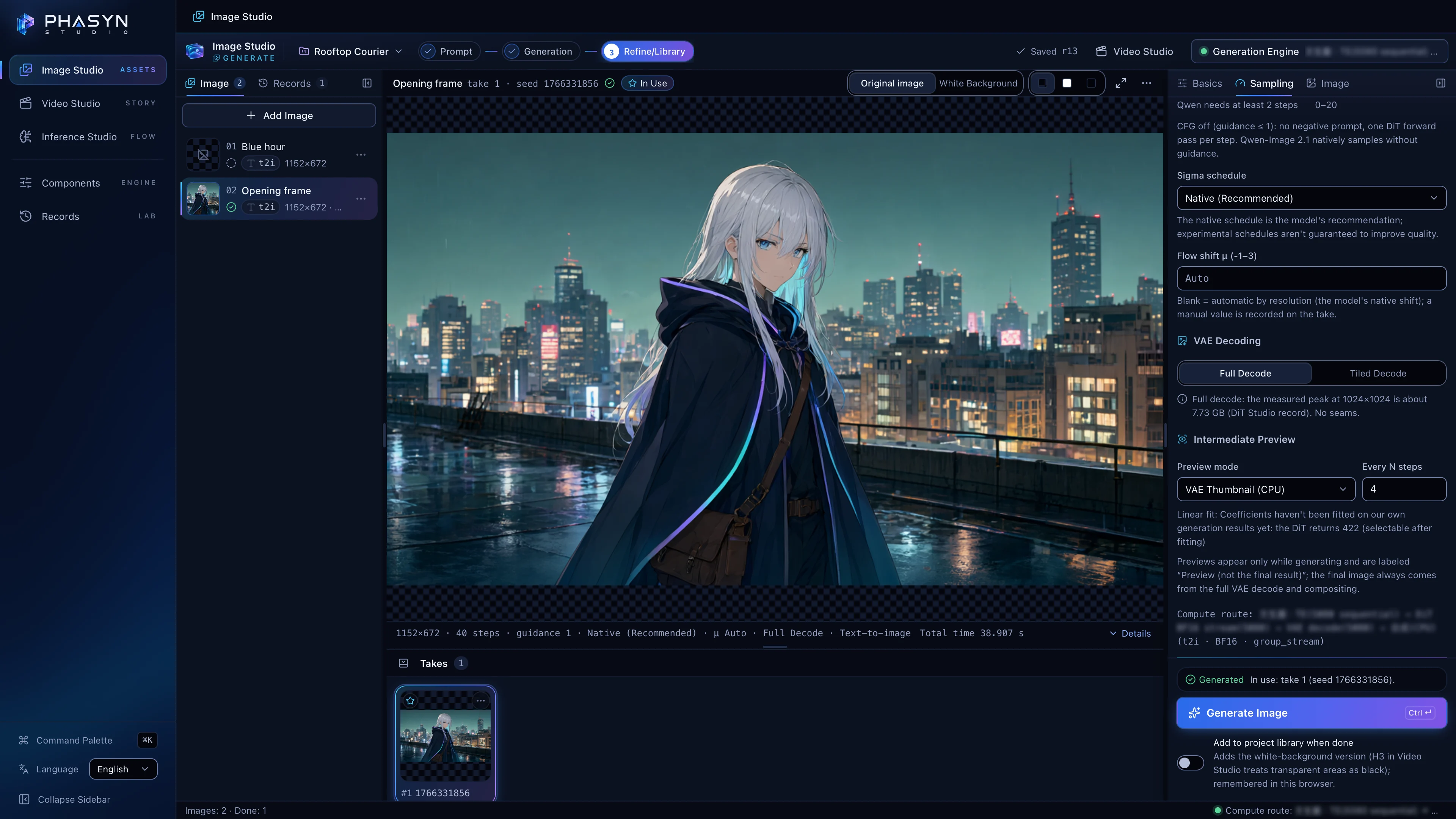
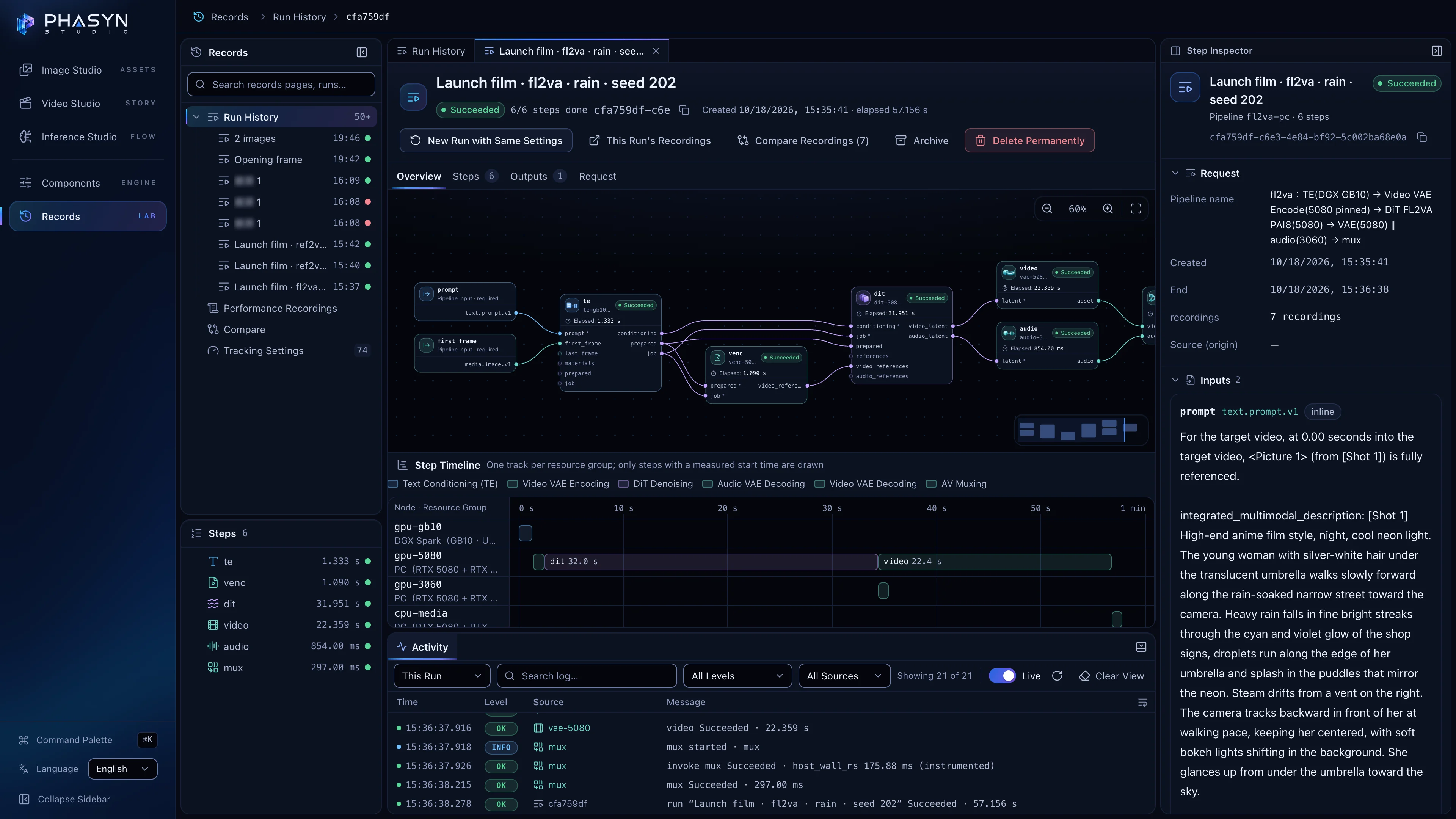
The interface is the real Phasyn Studio (English UI). The still and the clip are real output. Still: Qwen‑Image 2.1 through t2i‑pc, the pipeline Image Studio uses (1152×672, about 27 s end to end: text encoder, DiT and VAE on the RTX 5080, compositing on the CPU). Clip: H3 fl2va with that still as its first frame (768×448, 24 fps, 124 frames = 5.17 s, with generated sound). It is run cfa759df, the run in the Records screen below: 57.2 s end to end, with text encoding on DGX Spark GB10, DiT and video decode on RTX 5080, audio decode on RTX 3060.
Made for Real Work.
Every feature started as something I actually needed.

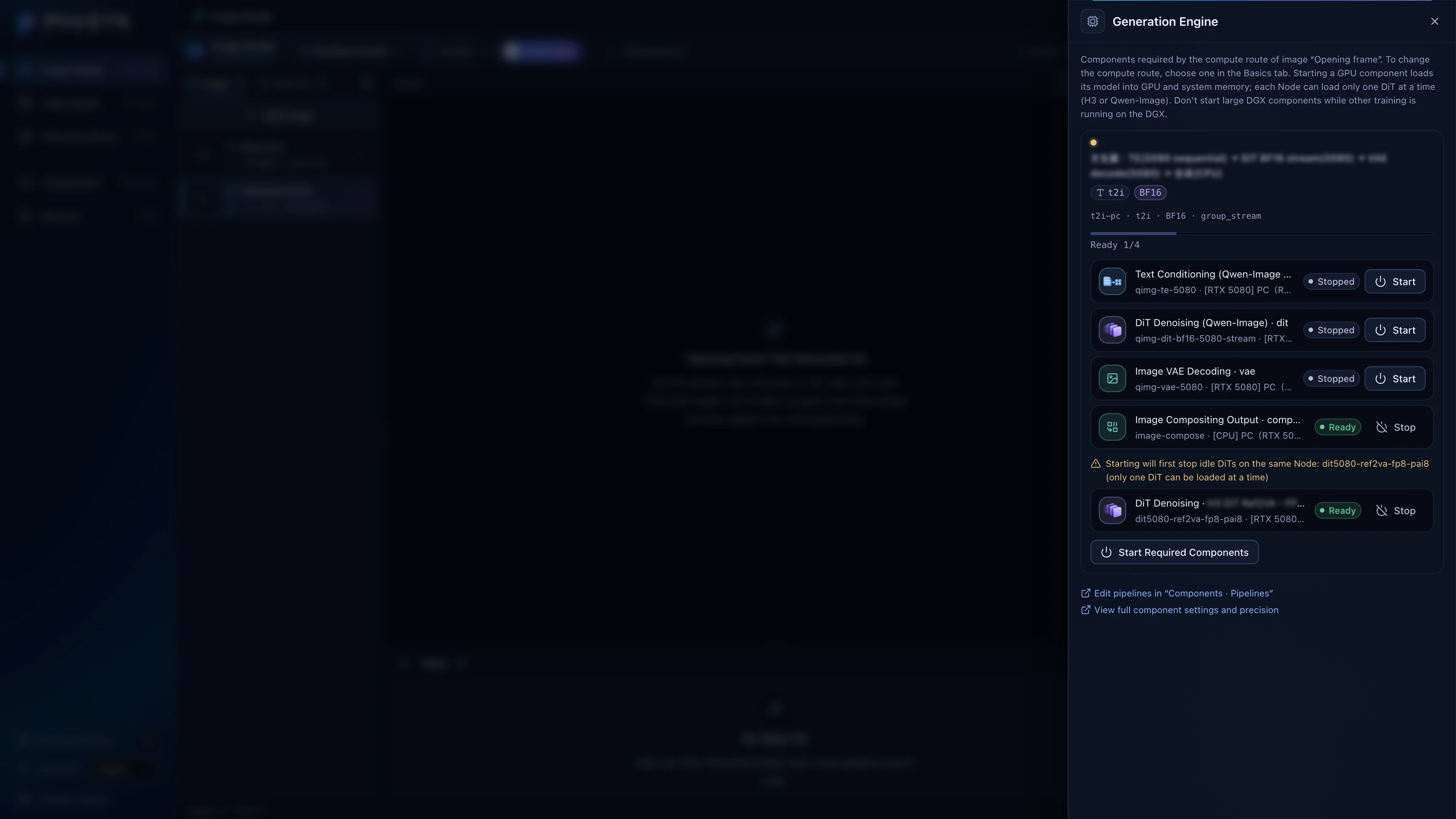
Prompt Advisor

74 rules check your prompt as you write — 45 from MiniMax’s official guides, 21 from the installed code, 8 from a writing guide. 21 offer a one-click fix, previewed as a diff. Every rule cites its source.
@ References

Point to references with @Image1, @Video1 and @Audio1 — each maps straight to an H3 tag.
Timeline and Export

Split, snap, dissolve, change speed, grade color and add titles — then export an MP4 with FFmpeg.
Measured output (2026-10-18): 768×448, 24 fps, 124 frames (5.17 s), AAC 32 kHz stereo. Export: MP4 (H.264 + AAC, fully re-encoded; CRF 18 / 23 / 28 presets).
Image to Prompt
Hand it an image, and a vision model on the DGX Spark writes back the scene and candidate prompts.
One Render. Two Machines. Three GPUs.
Every model component runs as its own process, on the machine you choose. The Recorder times every step — and anything it didn’t measure reads “Not measured,” never zero.

One Process per Component
Text encoder, DiT, VAEs and mux run separately, each with its own precision and offload. A crashing model doesn’t take the app down.
Node to Node
Large intermediates — latents, video — move straight between machines as FileRefs, not through the Controller; the Controller schedules, keeps records and serves the files you upload. Measured on 2026-10-17 (t2va): the DiT on the PC received 219–322 KB of conditioning from the DGX Spark in 30–34 ms.
102 Metrics Defined
Each with a unit and a method: CPU and GPU time, VRAM, transfers. One fl2va render (run cfa759df) recorded 82 distinct metrics across its 7 recordings. Compare 2–8 recordings; export JSONL, CSV, ZIP or a trace.

Built for Agents, Too.
The bundled agent skill gives an agent the phasynctl CLI and an optional MCP server with 22 tools.
phasyn_doctor · phasyn_run_create · phasyn_runs_compare · phasyn_recordings_compare …
phasynctl runs create --dry-run checks every parameter against the live schemas before anything is uploaded.
Script phasynctl runs create / wait / download to submit in batches, wait for completion and download the results; Video Studio also has Batch Render.
Experiment 06 ran once from the Studio UI and once over MCP: bit-identical output.
How It Differs
- Node-based workflow tools usually run the whole graph in one process. Phasyn Studio runs each model component — text encoder, DiT, VAEs, mux — as its own process, so a crash stays contained and one render can span several machines.
- Multi-backend front ends send whole jobs to different machines. Phasyn Studio splits a single render: text encoding on a DGX Spark, the DiT on an RTX 5080, audio on an RTX 3060.
- Hosted services offer higher resolution today. Phasyn Studio runs on hardware you own, with no credits, and records where every second goes.
Runtimes today: RTX 50 series, RTX 30 series and DGX Spark (GB10). No RTX 40 series runtime yet.
Multiple machines split the components of one render across GPUs. Today it runs one run at a time — not several videos in parallel.
Engineering Details: Architecture and Real Screens
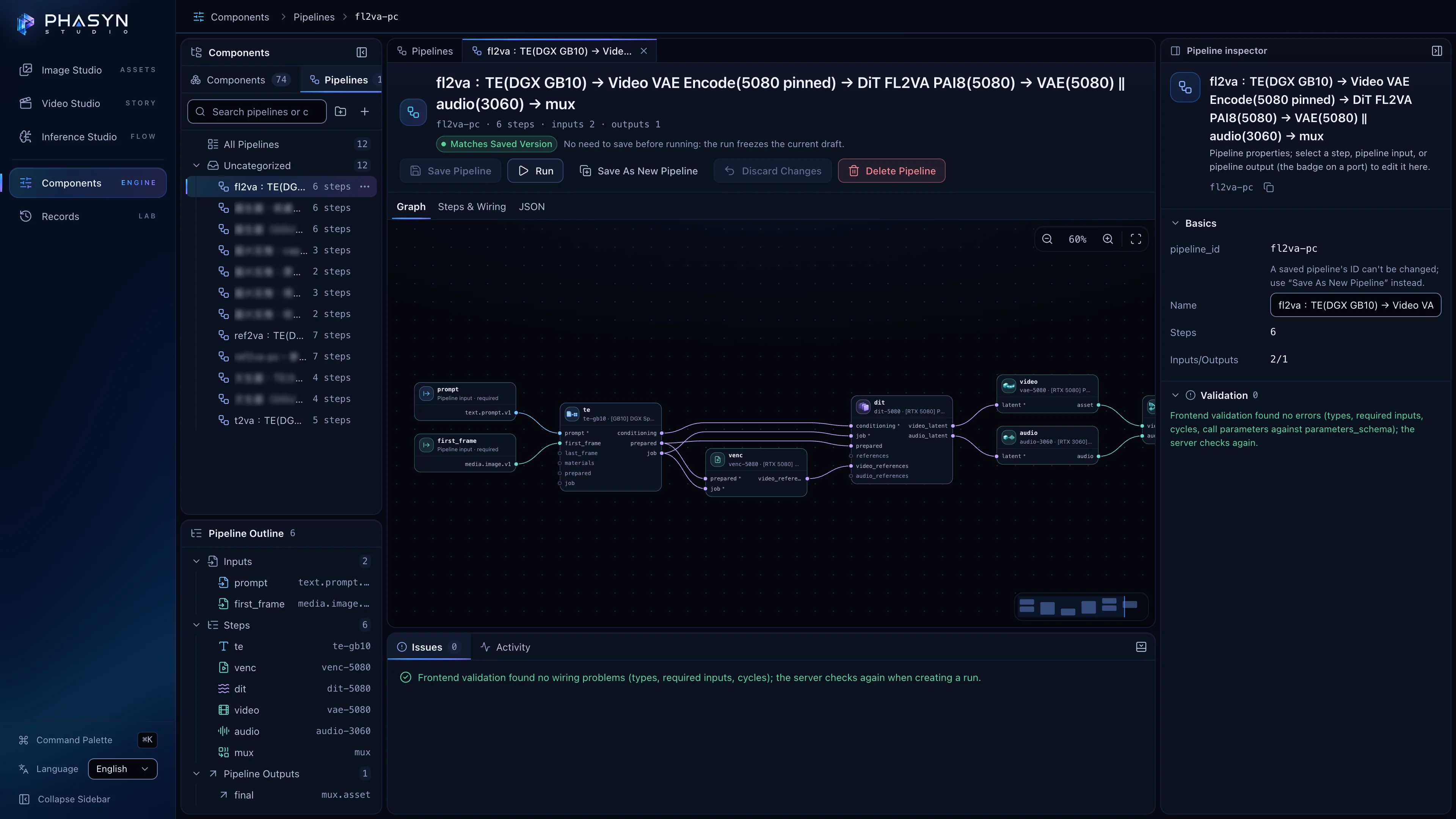
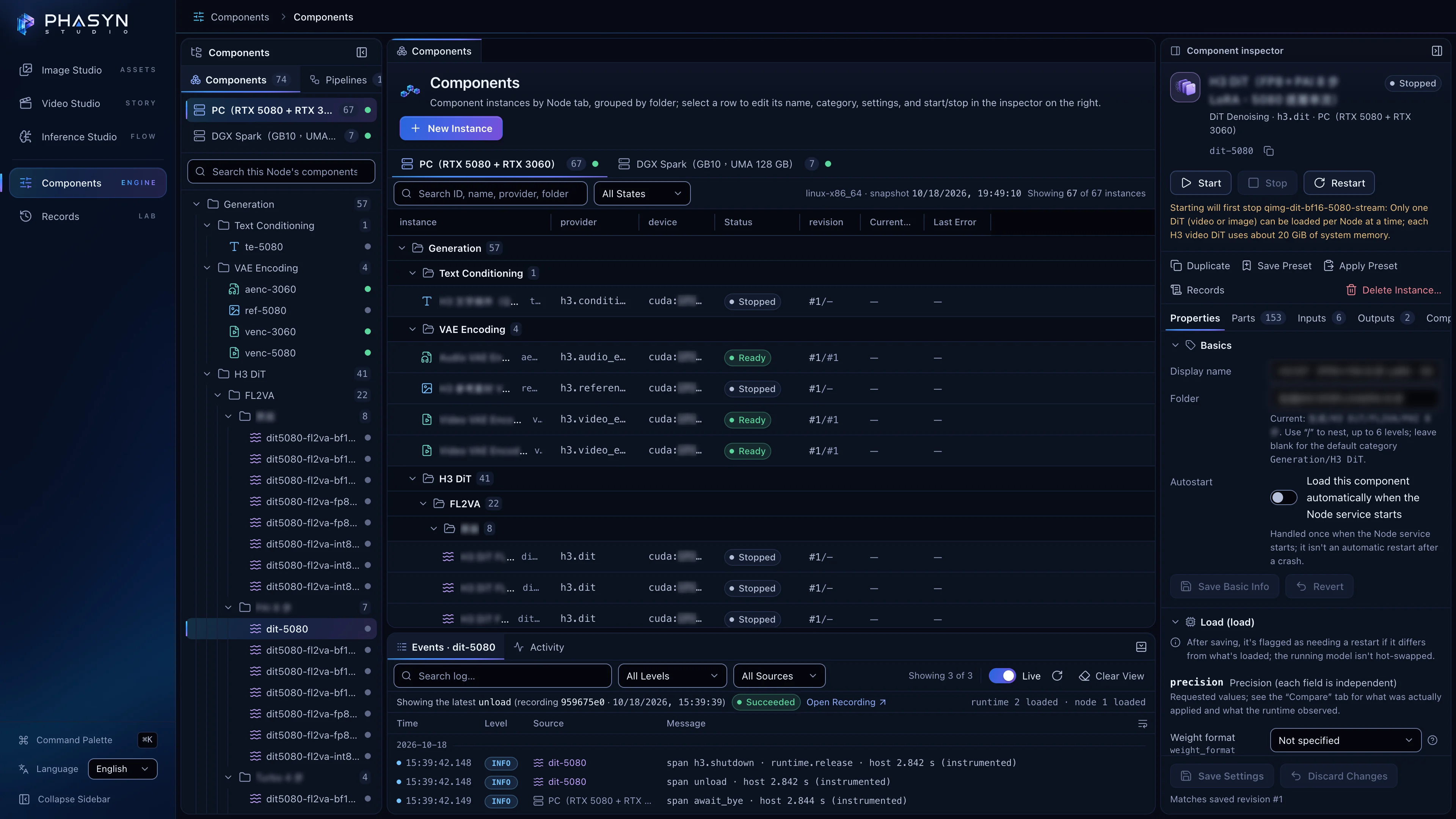
Measured. Published. Failures Included.
40 H3 DiT variants timed on one RTX 5080: 37 ran, and the 3 NF4 variants that never loaded are in the table too.
- A 5.17 s clip with sound
- 57–76s
- fl2va · 4 runs on 2026-10-18 · text on DGX Spark · DiT and video on RTX 5080 · audio on RTX 3060
- Fastest DiT stage, first call after a cold load
- 33.2s
- denoise compute 26.0 s · INT8 · PAI 8 · RTX 5080
- DiT variants that ran
- 37/40
- One RTX 5080, 3.2 hours in total · 3 NF4 variants failed to load and are listed as failures
Every speed names the machine that ran each step; where an older experiment’s archive lacks it, the step says “Placement not recorded.”
Find Your SetupNot Shipped Yet. Said Plainly.
In testing, coming, or a design goal — each one is labeled. Development follows my own needs.
- In testing
One-Click Character Swap
The five-step wizard exists; a full-video run hasn’t happened yet. Only use material you have the rights to, and never impersonate a real person.
- Implemented, not verified
Video to Prompt
Implemented, not yet verified on the real model.
- Coming
Remove Background
Background removal right in Image Studio.
- Design goal
Rent a Machine for an Hour or Two
Deploy, start, process, export, shut down — then switch it off. Not packaged yet.
- In development
Multi-Level Rendering · TTS and Voice Transfer · Super-Resolution and Frame Interpolation
Lock the shots fast with rough frames, then add characters and render; my own TTS system; a few upscaling and interpolation techniques being integrated.
- Planned
Plug-ins and Sliders · Broader Model Support · VAE and DiT Optimization
Finer control with sliders and LoRA styles; third-party models such as Suno music; video VAE encode and decode is still too heavy.
Ideas from ArtCraft are on the list too — not integrated yet.
Follow AlongCan I Use It Today?
- Download
- Not yet. There’s no download or installer today, and nothing to sign up for or pay. The source will be published under Apache-2.0 once it’s ready.
- Hardware
- You need an NVIDIA GPU. Runtimes today cover only the RTX 50 series, the RTX 30 series and DGX Spark (GB10) — no RTX 40 series and no Mac yet. Reference-to-video is a tight fit on a 16 GB card (measured whole-card peak: 15.91 GiB).
- Cost
- Free under Apache-2.0 once the source is released. Model weights aren’t included; get them yourself and follow each model’s license.
- Commercial use
- Qwen‑Image 2.1 is for research and non-commercial use only; MiniMax H3’s license excludes the EU, the UK, the Republic of Korea and the USA, and comes with an acceptable-use policy. Check the licenses before using it for a monetized channel, sponsored content or client work.
- Stay posted
- Follow phasyn on GitHub or Hugging Face, or write to [email protected].
Phasyn Studio is a framework: it doesn’t bundle or distribute any model weights. You bring your own models and use them under their licenses.
License textsMiniMax H3 Community LicenseQwen Research License
Your Ideas, in Motion.
Source code and architecture notes are coming soon. Follow phasyn on GitHub to hear about the release, find new media on Hugging Face, or just write to me.
Source code and architecture notes — coming soonAbout the Project